Machine Learning
Indianapolis AXUG Meet - AP Automation with Machine Learning
View transcript
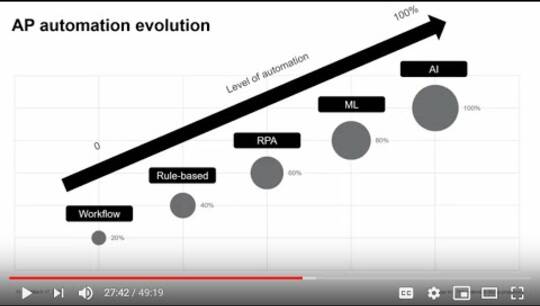
uh hoping to to come meet in person i think back in march and it was i think we were a week away from uh from the event uh when when uh some of the the flights started stopping and uh you know decisions were made and the big change so it's glad to uh finally meet here and and get the chance and the opportunity to present so um and thanks everyone for joining um so as mark mentioned my name is brent hamitner i lead the u.s marketing efforts here for do app and i am i joined with amanda strickland she's a solution consultant for do up and uh i would say for the next uh i think we had the the hour uh available but i think our presentation will probably be about maybe a half hour to 40 minutes and in that time we'll be talking about the ap automation with machine learning um and i think the reason we chose this topic is because we think it's it's become more relevant now i think as more companies in the past few months have shown additional interest in expediting their financial transformation initiatives um in which the ap automation aspect is is one of the components and so in terms of uh the agenda for today uh since the group is primarily the the users and partners we'll just start with a brief intro of do app um go into why we exist uh why automate ap to begin with and then why machine learning then i'll go ahead and pass it over to amanda and that's when she'll provide an overview of the solution and then i take you into the platform and show you the tool itself and of course as mark mentioned if there are any questions at any point in time feel free to raise their hand and we also have a q a at the end if we want to use that time um so getting into it uh as you might have guessed due up is an ap automation company we're based in austin texas so we focus exclusively on how the ax 2012 and fo for the u.s market our parent company is a company called a fema and it's a finland-based microsoft partner and system integrator uh fema's been around for about 10 years now it's grown consistently year over year um after about six years in the business fema kept hearing some feedback from their clients mentioning a need for improved workflows among some of the other challenges that we'll get into in a second and so they decided about four years ago to enter the u.s market uh with an automated solution hence and stu app and i'm not sure how many folks here know about the ap automation market but i mean in short it's quite crowded so we usually get asked what makes us different and i would say based on what we've heard from customers i'd say we have three main differentiators the first is our specific focus on the ax 2012 nfo erps many companies in the space they sync up with multiple erps and since our expertise deriving from the parent company lies within microsoft uh we figured we'd just stick with it uh in the second we're an extended solution existing outside of dynamics so uh as we'll see later uh it exists as an additional tab next to the d365 and they can run in conjunction with each other and we chose this because it uh really allows us a little bit more flexibility in the designing design phase for what our customers want um and not necessarily be too dependent on some of the dynamics releases uh to make updates um and then finally i'd say uh the last differentiator is the native mobile app so we actually have uh there's one customer who doesn't actually even use our we have a desktop app in a mobile app and one of our customers doesn't even use a desktop app since the mobile is is pretty convenient for them so um and then in terms of thinking about you know why companies might want to auto ap automation uh we kept the thinking really quite simple and and basically said okay ap uh receives invoices they process the invoices and then they pay the invoices and within this process there was actually a research company called level um and they surveyed some ap folks and asked them you know what were some of the challenges in this process and what they found was that the manual manual data entry and manual routing of invoices for approval were the top two challenges and as we see in this graph and and typically whenever you see manual in a challenge it usually indicates that there might be an opportunity to enter innovate and so that's really where do up solution uh lives and in terms of the the three main benefits that we see with ap automation uh there's the saving time and money the scalability and the increased visibility into the ap process for the saving time and money studies show that it costs about an average of about 12 to process a single invoice i mean when you automate that cost can drop down to around three dollars per invoice for the time savings uh instead of having to manually key in the invoice data into dynamics um one of the services that you have provides is a capture as a service and so that uh whole process immediately king of men would would already be done for you uh for the scalability aspect uh do you have we tend to focus on the mid-market companies a lot of our customers in the mid market and typically these size companies are going through growing pains they may require software to help them scale a little bit um and then finally the reporting capabilities that we have in power bi and the interface allow a user to understand really where exactly an invoice is at all times um which helps in that that increase visibility and so i guess getting into now uh why machine learning and then specifically why machine learning and accounts payable i think the reason why machine learning is interesting is because it's you can think of it as a transition from process-based automation to data-based automation um so in essence what that means is we're moving from your rule-based software where a user might set up and maintain rules for automation based on a particular process that they want to achieve um i guess an example of that or a simple example might be for example an email client if you want to send like an automated follow-up at a particular time or send it to a particular person at a particular time you set up the rules based on that that specific process and the difference with machine learning is that it takes in uh is that its database where it takes in historical data it generates a model for itself and then it will automatically recommend the appropriate process and so for ap specifically this can be applied to things like your coding as well as the workflows um and i guess with that i'll go ahead and pass it over to amanda and then she'll dive into the the solution overview and then show the tool itself with the machine learning capabilities go ahead and allow it all right all right hi guys i'm amanda strickland and um like they said i'm a solutions consultant with do up um brent kind of touched on it already but um do app is a 100 paperless invoice processing platform um we were built from the ground up in microsoft's azure cloud and designed specifically to integrate with um dynamics d365 fno and x 2012. um we live outside of dynamics as brent mentioned before but we integrate seamlessly and utilize the dynamics master data and business logic in real time and then we have the native ios and android mobile app which i'll show you a short demo on here in a minute um so what i want to start with is how the invoices get into our system um we have we have a few ways we have a full service capture as a service offering and then we also have kind of do it yourself through one of our partners where you can manage the ocr on your end but there's still an element of machine learning within that so our ocr platforms have um they take those invoices and they start building those templates and start learning where those pieces of data live within the image and then we will build out from there it automatically generates an xml and so whenever we import the image and the xml data into our system it's going to automatically link those with vendor information pull in the master data from dynamics it's going to pull in the company the invoice amount the currency all of that for you automatically so your ap people aren't having to go in and fill in that header data it takes out some of that manual work um so once they get in um the invoices arrive into due app and then they can either with our po process we can have it be fully automated so if it's three-way match all the invoice quantity invoice amount is within tolerance it can just go straight through no approval is necessary unless you choose to have an approval process and then with the non-po you have their your invoice approval process it goes through the proper channels you get the the coding and and then the invoice is approved and i'm going to show you some of the pieces with the workflows and our um our coding um the dimensions that we do have machine learning um associated with so here's um just kind of an overview of what what's offered so we have an approval workflow that essentially lives outside of the restrictions of the built-in dynamics workflows and it's designed specifically for invoice processing and i'll dive deeper into that whenever we get in there but you can have conditionals you can fetch from po approvers um if an approver is necessary um things like that we have the coding of non-po invoices which can be coded to both ledger accounts or projects the coding is validated in real time against the account structure within dynamics for po matching we have two-way and three-way matching of po invoices and upon import if the po is listed on that invoice do-up will automatically um pull in any purchase orders or product receipts that are associated with that with that purchase order and if there's any deviations in price quantity or if the invoice includes any miscellaneous charges um all those adjustments can be done within the dueout platform we also offer reporting through powervdi and as part of the implementation process we customize a set of standard reports and we can also we also have a team who can build out reports in addition to our standard set that um can be used to suit your business needs if our reports don't have um a particular set of of reporting capability um all the invoices are stored in a dedicated database in the azure cloud and you can also have an offline copy anytime uh we keep detailed blogs of the actions taken within the system including an audit trail of all approvals taken on the invoice and any changes made to data in addition to any dynamics related messaging upon transfer and this is all surfaced in the ui so there is a spot where you can see all of the the actions that had been taken on particular invoices and then since we're built within the microsoft azure cloud we're continuously making sure that we meet the requirements for compliance so here's a short um overview of our mobile app so whenever you enter into the mobile app it's going to load up and it's going to load a stack of cards so you'll see there's two invoices ready to be approved you can swipe left to move that card to the back of the stack or you can swipe right if you know that you want to go ahead and approve that so say you've already looked at it and you already know what's going on um to get into the details you can click you'll see the details here you can also do it by clicking on the menu at the top you'll be able to see the full invoice image the whole workflow any comments on that coding so you can actually do coding within the app and you can also return from here and change the workflow if you have those permissions if you accidentally send it to the right you can undo um and then and that's basically the app the other things that you can do within the app are you can um so as i mentioned before you can do the coding within there so it's fetching those dimensions directly from dynamics within the app which is something that kind of sets us apart it's it's a pretty it makes it to where as brent mentioned you don't even need the desktop version if you don't want to for your approvers the other thing that you can do is you can assign a delegate to handle your invoices while you're away within the app itself and you can set multiple delegates for multiple time frames here's some examples of the data that we're sharing in real time between the two systems so you'll see that you have your master data for the vendors your account structures any projects purchase orders and product receipts all of your users from the user table um all those types of things are are sent over the big pieces like the master data and the companies those are imported twice a day but then with your purchase orders your product receipts and your account structure that's all a real time fetch api call all right so now let's hop over into the system so this is our basic landing page this is what all of your users are going to see whenever they come in but depending on their role they may see different options up at the top so it you can see it up here we have our modules i'm in as an ap um and i'm also an admin so i can see our admin menu this is where you control all of your configurations vendor defaults so if you want to default workflows for specific vendors for specific invoice types you can do that all within the admin menu highly customizable you'll see here that we have um the workflow visible when you're coming in and this workflow is for your top active invoice now what what you're seeing here is um is a kanban style layout to where you have your previous invoices and these are invoices that you have previously handled and it's really useful when you select a an active invoice it'll filter out based on the vendor name so if you're coding a non-po um you would be able to look back on what you did previously for that vendor if necessary you have your active invoice which will automatically pull up based on an algorithm the invoice that it believes you should handle next so typically your oldest invoice it takes into account um three different dates so the invoice date the due date and the cash discount date um and then you have your queue of next invoices so here um on the side you'll see that we have the full invoice image um we also exposed the xml data if you ever needed to troubleshoot um anything maybe not coming over like a vendor name you could troubleshoot and see if maybe it was just it was named different um so things like that and then as i mentioned before you have your your full history of everything that's been done um on this particular workflow changes to data fields changes to movements in the workflow comments and comments added transferred to bookkeeping any of that two things i want to highlight before i get into the machine learning piece of it is um we we have the our non-po and our pos so we have two different workspaces within due app you'll see that we have a po workspace which pulls in and this is automatically pulled in this purchase order 2167 and the associated product receipt if i needed to change that i could do so by opening it up i can x out of the ones that i don't want and i can select the new ones from the list and these are only showing the purchase orders for this particular vendor and then you'll see i'm going to collapse this real fast so you can look um you'll see here that we have all of our our po line information here anything that's blue in this section you can actually adjust so if you need to do a partial um if this is just a partial invoice for a po you can adjust and um and then send it along for approval um you'll see here i have a difference of 95. that is because on my invoice i have a miscellaneous charge we can add any miscellaneous charges here in there and you'll see that it it adjusts that difference and now we're we're good to go and we can send it along whenever you're ready to send it along you can just press the check mark if you have two invoices like i do up here it's actually going to look to send both of them if they both are error-free i'm not going to send it yet because i want to show you the non-po workspace so you'll see here that we have our non-po workspace it's pulling in um let me open it again it's pulling in the dimensions that i had already set but to go into the machine learning side of it we have um we have these little bubbles and it's going to start to learn what kind of coding you do for this particular vendor situation so um it's going to say 71 of the time you use these two um 17 of the time you use these three six percent of the time you use this setup so it'll start to learn what what you're using and what you're doing and it'll start to get some better predictions of what um what you should do and suggest those for you makes it a lot easier you don't have to actually go up and look at these old invoices in order to see what the coding should be um so that's super helpful the other thing um is you'll see here um as i select um so we'll see we have all that selected now it's going to automatically pull in the account structure like the available item groups within the account structure that i've chosen so far so it's dynamically shifting what your available options are each time that you select a dimension so it automatically fetches those um the other piece of machine learning that we have you'll see up here at the workflow level so this is an example of one of our workflows um it has a lot of the things so we have our accounts payable which is me and then we have our next approver but we also have it split out to where there has to be two approvers so it you can basically build it out to where if you wanted to have um multiple lines of approval you could do that and then the ending approver person could be the same if you wanted it to be and they would only have to approve it once if they were the end but you'll see here that we also have this conditional so we can set it up to where um certain people don't really get um pulled into the approval process unless it's a above a certain amount of money um so if you have you know a hundred thousand dollars is is where you need mike to come in um and start approving things you could have it it go through without mike's approval until it gets to a hundred a hundred thousand dollar invoice and at any time if you have the the ability you would be able to change the handler um here's your fetching from po so we can have it fetch from order fetch from requester this doesn't really make sense in this non-po one but um on your po ones you would be able to do that um and then you'll see here we have those same bubbles and it's gonna let us know how what workflow we typically use and like i said before with our admin menu um you have full control over setting defaults so if you have a bunch of workflow presets set up and you go in and decide that you want to have this workflow every time for this vendor for non-pos um you can set that as a default and it'll pull in automatically but then if there's some certain situations where you need to adjust that workflow you would be able to do that and it would start learning that and if you did it you know if it was like 10 of the time it would start to learn like 10 of the time you have this other one and that would be available for you so if you had lots and lots of of workflow presets like a lot of our customers do you don't have to go searching for those it would automatically let you know like hey this is the one that you're defaulting in but sometimes you use this other one and so it's very useful to um to make everybody's life easier for the the machine learning uh amanda yeah there was a question from ritchie who's asking does it respect the delegation functionality in ax so as far as um if there's a delegate set in ax is that same delegate going to be in here and if you want to unmute whoever asked it you can ask me or answer he said yes amanda okay yeah so it's it's a separate delegation so it's not talking to each other but um i think that is something that we're looking into is getting a little bit more um more compatible with pulling in those kinds of things right now it would just be um adding a substitute for yourself up here um and then they would then see that information here but right now it's not looking at the delegation within um ax but that is something that we're looking into any other questions i know this was like a high level overview but i can i can dig into some other stuff if anybody has anything i'm going to take silence as a no i'm not seeing any more questions i think we're good okay oh cool that's uh um that's about it for my demo part brent do you have anything else to add uh no i mean i think that's for the most part everything that we had to share and i mean we have contact information we could just put it in the chat after this um but i think that pretty much concludes what we wanted to talk about huh how are people in the with d365 i mean as far as like i guess it's acquiring that or or the scanning of those invoices in are are they you mentioned you have a particular ocr product i think but how how are people typically doing that in d365 or are you seeing as far as what you're using as far as the tool to actually bring those invoices in into the uh over from due app to d365 yeah so we do have um a document transfer um that will pull in any um the invoice image so the pdf it'll transfer that pdf image over into d365 along with any attachments so didn't touch on that but um you're able to add attachments within due app and when the when the invoice is transferred to payment it's going to send over all the data obviously and then the invoice pdf and any attachments that are that go along with that and so we have that available as well to have full full document transfer great [Music] does anyone else have any more questions or hi well i thank you brent and uh amanda for the presentation today uh i really appreciate it um i'm sure i say that i'm i will share their your contact information too if they think of things later uh again this will be recording be put out there as well so people can come back and watch again if there's something they missed or think of something a little bit later that they'd like to ask um i will share my screen one more time here uh there it is um thanks everyone for attending today uh virtual presentation and uh would remind you we have a another virtu our next virtual meeting is september 17th on d365 testing strategies and tools rangeline solutions we'll be uh presenting on that topic we're always interested in your feedback and topics that you're looking looking for us uh you have interest in we're happy to organize that and put that together for you as your local chapter leaders and certainly if you want to become more involved in chapter reach out to me and i can help you learn more about how to become a uh more involved with the local being a local chapter leader and helping put together these presentations like this thanks again brett brent and amanda for your time this afternoon and that's really all i've got today so thanks everybody [Music] thanks very much mark thank you thanks guys you