Webinars
Basic digitization or complete automation webinar with Levvel
Presenters: Anna Tujunen, CPO Dooap and Major Bottoms, Senior Research Consultant, Levvel
View transcript
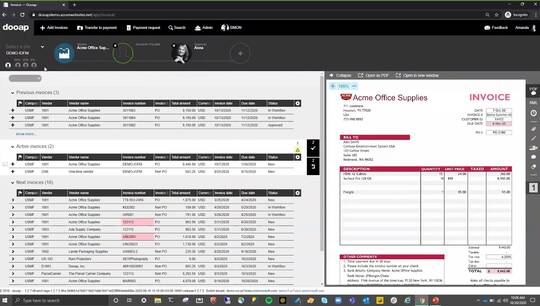
hey so to introduce myself my name is major bottoms junior i'm a senior research consultant here at level um i've been with the company for five years um leading back to the days when we were going by pay stream advisors and i'm an expert in procure to pay software like do app um travel and expense management software as well as electronic payment software so one of the better people to be giving this presentation and i actually designed the survey that a lot of this data comes from so you might be asking yourself how we got this data um so we interviewed financial professionals at all levels organizations in q1 2021 a lot of the questions that we used are the same or similar to ones that we've asked in the past just so that we can track trends across time we make some small tweaks just to update it every year but um the integrity and the overall feeling of the survey stays the same year over year we surveyed over 300 respondents operating in a number of different industries and at companies of all sizes so when we're looking at a range of accounts payable solutions um really the best way to break it up is into three different tiers um tier three is a completely manual process um unfortunately that's what a lot of organizations are going through um you know they're sorting through their inbox to deal with invoices sending them to leadership for approval via email or even walking it over their desk um and as far as input of the invoice data into you know a software or their erp they're actually manually keying that in most of the time so that's tier three tier two consists of partial ap automation so um users might be utilizing an optical character recognition tool so they can scan the information from the invoice onto their erp or onto their accounts payable management software accounting software but largely it's far from an automated process they're still using some level of uh manual input or a manual process involved in uh processing their invoices uh the final tier is tier one and that's end to end ap automation so a lot of the low hanging fruit and a lot of the more a lot of the more tactical tasks are being automated which frees up those users to handle more strategic tasks normally it's a cloud-based tool um web friendly can be used on a number of different platforms whether that's the computer a mobile application in addition it offers some security and payments um so it's really just automating um the entire accounts payable process from the moment you receive you send out a purchase order to um when you're actually sending over the payment to the supplier and this is some of our in-house level research data this is a way we can actually quantify the stuff that we were just talking about in terms of tier one and tier three and tier two types of tools so everyone says that they're automated or everyone says that they're using a tool um but in reality when we look into the data we see that only 31 are using a third-party automation software which is more likely to be to fit into that tier one of end-to-end automation um that number has grown quite a bit over the years um but the most widely represented or the most commonly utilized software is going to be something like an erp tool or something that's not specific to ap so there's there's a wide range of solutions that are non-ap specific it could be something very simple like excel or spreadsheets or it could even be just an accounting software because ap software offer differing levels of automation and all sorts of different experiences what we've observed is that well over 50 percent of organizations that are using some sort of tool identified themselves as actually being pretty likely to switch their ap software in the next calendar year presumably it would be a lot of companies that are upgrading from a tier three or a tier two experience to shoot for something that offers end-to-end automation like a tier one tool uh would offer this is a relatively new trend that we've observed and it's popped up in the last year or two some of it is definitely attributable to frustration with a lack of true automation offered by some of those tools i believe but we believe that the pandemic is actually supercharged and sped up this trend quite a bit um so at the outbreak of the coven 19 pandemic many companies were forced to learn just how much their tools actually allowed them to operate in a fully remote environment and if you're if you're looking through emails without communicating with team members to the same extent as you would be if you were in the same location or even going into the office to retrieve and open up paper documents you're to see how unsustainable this process is and it's going to expose your organization potentially to risk things like duplicate payments and just overall delays in the process so not only is this manual experience super frustrating but it could also be a health risk you know with cdc guidelines recommending obviously that people avoid intermingling in office environments and kind of just obviously social distance so um if we'll go to the next slide here um we can actually go to the next one after this so here we see what the data actually says on why organizations would like to switch their tools as you can see there are a number of reasons no one reason really dominates the conversation the top three reasons that organizations are considering is because the software isn't cloud-based it lacks advanced analytics capabilities and it lacks strong security but there are also a number of other reasons why these organizations would consider switching um really it comes down a lot to the basic functionality of the tool and how easy it is to use and how many steps of the ap process that it's truly automating so now we're going to dive a little bit deeper to get an additional detail on some common themes that we detected um across these uh different uh reasons for switching so the first one that we see that we want to take a closer look at is uh poor quality customer service um so erp based tools and more data tools generally are gonna sometimes offer a pretty bad experience as far as customer service is concerned um ap probably isn't their main focus and you know that requires a lot of finagling to even reach the correct party um if you do reach out for customer service um and you know when money is on the line and there's going to be a delay potentially this is kind of the last thing that you would want to experience a third-party tool is going to typically offer a much better experience for customer service usually they have dedicated teams that are experienced in some outages or common problems with the solution um and just generally they're going to be a bit more helpful than what we've seen from some more data tools they also have uh they also are very upfront with their service offering as far as how quickly they typically resolve outages and how how quickly they typically resolve just general issues and how quickly they can get you back up and running so on-premise tools uh the second um the second reason that we're gonna take a look at is that current software isn't cloud-based right i said this one a little bit earlier um we find that on-premise tools are usually harder to update they're more difficult to operate as a remote team and they can be less secure so there's often a thought from government organizations that on-prem tools are safer and less risky than cloud ones but this line of thinking is becoming less and less popular as you see um since cloud-based tool or the lack of it being a cloud-based tool is one of the top reasons that we see why organizations are considering switching and cloud-based tools do typically also scale better as an organization grows and as invoicing and volume demands increase um so this kind of covers how advanced technologies improve the ap process this is definitely one of the more recent trends that we've seen and it's also linked to the experience of using a data tool um advanced third-party cloud-based tools are going to offer a more modern experience so what a lot of organizations are looking for in their next tool is more advanced analytics and stronger security and both of those things are super important right now during the pandemic advanced analytics that are powered by artificial intelligence and machine learning are going to give your organization the ability to better forecast financial health and ensure that the organization has smooth sailing in the future um and similarly strong security um it's we've seen an uptick in instances of fraud uh during the pandemic so that's something that has been increasing in importance for organizations that are shopping for another tool additionally the organ the software being difficult to use is another common theme that we've seen and that's another one that advanced technology is going to empower at the end of the day you can have all of the bells and whistles and have a very advanced tool but if it's not easy to use organizations just are gonna we find that organizations are gonna sidestep it in favor of um what they were doing in the past so lacking fraud protection kind of goes along with strong security but these are a few of the things that we've seen that we believe that a third-party cloud-based tool that offers a more advanced experience and leverages advanced technology can kind of solve so the last reason we chose to highlight is the line of thinking that software is too expensive and this kind of underscores the importance of discussing that pricing upfront with providers and getting to brass tax and calculating a return on investment either with the provider or just independently and we've seen that a lot of providers actually offer roi calculators right on their website so the thing to one thing to remember on roi whenever you're starting out is do not let the perfect be the enemy of good enough right so you don't want to get so bogged down in exact in calculating exact numbers with invoice volumes and potential savings what you really want to get to is a rough estimate that's going to give you a good starting point so the first element of roi that you should consider is getting an approximate cost of ownership for the tool and we break those into two categories so the first is upfront non-recurring costs and that's going to be something like implementation fees and then the second cost category that we have is recurring costs to license the software and those are usually either volume or transaction based or just based on how many users operate in the software so that gives you a good idea of what the cost element is going to look like and you'll calculate that year over year with the first year being the most expensive as you're having some of those upfront costs but that cost going down over time as you're only paying to license the software so how the tool is going to return investment is in time savings so once you're automating those tasks your department's going to operate more efficiently in terms of saving time spent processing invoices making lower cost electronic payments and even making it easier to uh obtain early payment discounts and you're also going to decrease the time spent on dealing with invoices and air with errors and communicating back and forth with suppliers via email because a lot of these tools tend to have supplier portals built in so these time savings uh free up your ap employees to handle more strategic cost saving tasks and departments with automated ap are able to operate more efficiently and therefore they're able to manage more invoices with fewer employees um meaning as organizations get bigger and expand and presumably invoice volume goes up alongside that they may not necessarily have to add more employees so that's a little bit about pricing we can go to the next couple of slides good so the package solution should cover these needs um invoice receiving whatever channel uh kind of you need for digitizing a paper uh even emails and edi for example then the erp integration and of course integration throughout the process uh user-friendly web app where you have kind of like the control over the control center for for the process and there you can see the coding matching workflows was happening native mobile app for mobile approving and then payments processing of course as electronic and automated as possible and like we saw in the survey results let's not forget how important are knowledgeable on boarding and and after that the support for for users is and speaking of which one testimonial that i do want to show you is from the series they they were originally very far with with uh implementation project with another d365 embedded ap solution but in the end uh it was impossible to finish that project with uh with the lack of process consulting in in in a complex situation so when changing to a new d 365 and dealing with a challenging transition project with a tight deadline having a good team that can suggest best practices and alternative solutions uh to do things is is pretty much priceless uh also another example of a company that has already tried uh other d365 ap solutions but some things were just not about working out in the a and key things have been for a lock for example the future set ease of use and simple ui and then again easy easy integration and support good um so what we offer with duop is a good user experience and and starting from the user-friendly web app and mobile app and reports but also the easy integration easy onboarding and our reliable customer support team with the onboarding you can choose actually the level of collaboration you wish to have so for anyone with with experience in ap solutions and and g365 this can almost be an independent implementation whether with a for example a quick few hour training or if it is a complex situation and you could benefit from an analysis on what ap processes would work the best we're happy to support uh support with that too and now i'm i i want to show you a solution overview uh to actually show the demo and uh just a kind of a quick recap on the on the elements that that we offer with do up of course everything starts from from the inverse digitization whatever the channels are that you wish to choose who if you want ocr if you want uh capture as a service that is the first decision that that needs to be made for example uh invoice capabilities or something something that we do support out of the box and we are part of the um fed uh led a federal reserve bank led uh invoicing uh project that that is uh uh uh undergo and uh there will be a market pilot starting next year but kind of when those invoices arrive to do up it starts then with with uh kind of managing uh the workflows seeing uh all the information that was captured uh doing non-po coding based on the account structures in dynamics doing p or matching automating that with the three-way matching rules for example and everything that is happening is based on the master data from uh from dynamics so we integrate seamlessly with dynamics we utilize uh you utilize the business logic there real time for example vendor master data account structures and and currency calculations and so forth power bi is is used for reporting and also there is a really neat archiving solutions where you're able to for example get a get an offline copy of all your invoice data good but now i am going to open open the desktop demo and uh here i have the dynamics uh d365 and i am going to navigate to my dua module from here from the duop module i see the setup links i also have the web app i have the power bi link but i am gonna gonna first now go to the web app and it recognizes me as a user it has been designed to work side by side with with dynamics it is showing me the invoices that i have to uh have to uh process based on the role that i'm working on i always have at least one invoice in the active invoices section which is which is the invoice that the software is suggesting that i handle first i do have here previous invoices section two where i'm able to pull information to the current invoice that i'm handling for kind of uh clarity's sake i am gonna close that now because we're focusing on the active invoices and the upcoming invoices that we have in our queue when i have this invoice here in the active section i can see that invoice picture i can see the workflow related i um based on the invoice type i can see whether it has coding or whether whether it's for example p or matching i have also multiple different kind of tools for the document handling i for example i'm able to add attachments i'm able to see a full audit trail of of all the actions that has been done down to the invoice and i can move this invoice to inverse to another screen so i can work side by side with two windows i can print it i can email it i i am able to also set it as a security invoice meaning that if we have data that is uh sensitive you're able to limit the the visibility to the invoice invoice picture good uh the coding like i said it is uh connected to dynamics so every time i'm doing changes in into the coding it is able to to validate that information based on based on the dynamics accounting structure we have machine learning that is uh that is um um suggesting the best uh coding based on all that information that there is on that invoice and we have for example here machine learning for also for the workflow so based on the information that i have in the coding i for example have have now a 99 chance that the the workflow would look a bit different and if i do any changes in into the coding uh that prediction might even change based on that for example now with this uh a bit more obscure selection of of the coding my uh suggestions just dropped and i am able to select from there the the kind of based on the probability the suggestion that machine learning is is saying for for my coding and if i go back to that most common case of of having a 99 i'm pretty confident now with this this workflow with this coding and i'm able to push this inwards forward in the workflow and the idea is of course that ap would only get the invoices that there is something that they need to take a look at and for example here i do have a po invoice i have here the line line level information of that matching there isn't anything now currently that i do have to do for this invoice so normally this would be something that would be pushed forward in the workflow but just to show you what we we are able to do when when reconciling or doing the matching for for invoices that have discrepancies you're able to change the matching uh quantity you're able to add multiple pos multiple product receipts uh change matching price um and miscellaneous charge codes these also are following the miscellaneous charge goes that there are uh there is in dynamics but we have made the adding of the of the charges a bit more easy here in in the do outside but in normal situation in your kind of ap wouldn't have to have to approve this but uh whether kind of there is a three-way matching rule uh in the dynamic setups in the background it doesn't have to stop for the approvers uh for for for the approval uh and uh we are able to of uh for for example push uh or pull the information of the order or requester from the original po to be the processor of of this invoice if there would be a discrepancy but same thing here again as it doesn't have to now stop for those approvers it will actually go now flow directly to dynamics and i will get then the next invoice uh to be to be handled uh functionalities in in the workflow uh it can kind of the or the hierarchy how it is determined there is multiple multiple possibilities how that that can be set up so you can have for example uh as a kind of position hierarchy from dynamics as the basis of the workflow or you can build for example uh a workflow hierarchy here in do upside you can base that for example to a dimension and what we have uh coming out in in the next version is the ability to tie that also with the dimension owner from dynamics so basically you're able to automate that that with multiple multiple different different kind of methods and of course there is that that purchase order related uh approval uh kind of approval pulling if you're already using a hierarchy with the purchase requisition with the purchase orders so so that we're able to follow the same logic there and uh of course monetary limits thresholds and so on are are available too good uh in this situations um in this situation i'm happy with the with uh whatever selections i have i could for example add new coding lines i could split the existing coding i i could code directly to a project but uh but um i'll just now push this invoice forward in the workflow for the approvers and the approvers that i have here i would be able to as as a ap i can make a changes to the workflow on the fly if i need to uh it is flexible and if you're not wanting to have any flexibility in in the uh rights that ap have for for for making changes you can also block that that they are not able to do do changes to the workflow but visibility is really really important so for example as an as an ap function if i want to go and see what the situation is for foreign approver i can always go and impersonate a user and see what their approving situation currently is so jumping into into benjamin's shoes i am i am now seeing what invoices there is and benjamin's queue i can uh add comments and ask ask questions that does benjamin uh need help or or or clarity after all i see that benjamin's invoices are quite old good i'm gonna stop the impersonation now and uh one cool function that that we also have is a substitute function where uh for example a substitute can be set for a a kind of a limited time or you can also set a substitute for a longer period in that situation uh an approver a colleague can do the same kind of impersonation when needed if if if you have if you have distributed the substituting rights and it is really kind of clear for those users as you're you're you have your own invoices in in this main view but you're similarly uh able to jump into into the the person's shoes that you're substituting and see their invoice history and be able to pull information from those old invoices good uh for now thinking that okay we have pushed a few invoices for approval uh the next step then would actually be in uh in approving those with uh with the mobile app and uh looking at the mobile app how it looks like it is uh for apple and android and it is meant for approving uh both non-po and po invoices it shows all the all the necessary information and you can cycle through invoices and and all that invoice data that there is we have designed the app to show the necessary information that users need to be to be actually really able to approve invoices remotely and for example the ability to show previous invoices and and the and the coding uh coding related to those you can also se change or add the coding in mobile and it is validating the selections to d365 account structures just just like in the in the web app and as a final thing i want to show uh one of the best parts after i finish finish approving approving those invoices with with my mobile i want to show the analytics and there we go um do up analytics is it is a combination of dashboards and ap tools so so ap tools is something that one might use for day-to-day work for cross-checking and reconciling for example and also also the dashboards like the cfo dashboard and vendor analytics dashboard that i have have here as an example so uh these have been designed to give um excuse me sorry these have been designed to uh to give um a kind of a good uh bird's eye view on those in that information what the cfo is for example interested in to be able to see uh the the uh uh kind of key figures but then still able to for example drill through or to all that all that data uh in in it to kind of get into the to the core of things for example here in uh the average handling times i can see that over the years we have come down very nicely with the average handling times and if i want to drill even even more deeper to uh see um drill down there for a second so to see for example the monthly uh figures and to go even further for daily figures i can see that fluctuation over time but yes what i really wanted to show is the vendor analytics so the vendor analytics is a new new report and this really shows uh the ability to do analytics in in uh how to improve the automation so uh very often when we think about automation we are kind of looking at what what we can do and what what what's what is happening now our processes but with the vendor analytics we're also able to see what our vendors are doing and what could we improve without with our vendors everything in this report is is kind of multiple reports in in one view so with the tooltips i'm able to get always better information on what those figures are and i can always drill deeper drill uh through to the to the actual data level of of all these factors for example here to be able to see which are the vendors and how much uh uh um kind of in in money-wise are we paying as checks is there something that we could do to improve that process as we do have a few vendors that we're sending very very big checks to or for example uh we do have uh companies or vendors that have an immediate due date is there something that we could negotiate there and also i think one of the cool features is is the ability to drill and and examine um kind of windows with the workflow and and so forth and and i'm able to see which companies again are the biggest vendors and if i click on on a company i can see which kind of uh workflow presets we're using with with that then this means like a workflow template who are the approvers and and click clicking that workflow preset i'm also able to see the approvers that there is related and then i'm able to also also for example see the approving times so with this um vendors uh invoices i can see that that schuyler's approving time is barely hours it is really fast uh ap does have an average handling time of of uh 3.65 days for it but after that when ap has done their thing skyler is in approving uh a china resources land avengers invoices immediately but then if we want to want to take a look at for example another vendor so let's uh i'm going to randomly choose something else so let's click on this i can again see different kind of workflows and then i'm able to see again skyler in this case in another vendor's case there is 23 days that schuyler is sitting on these on these invoices so this kind of gets me thinking that maybe there is something in schneider electric invoices that repeatedly uh makes it so that schuyler has to do a lot of work and to get those invoices approved it means that is there something that the vendor is not recording correctly or is there always something wrong with that with the pios for example that requires extra work because i don't think that schuyler would otherwise just approve the other invoices immediately and then spend while uh 23 days over 23 days on another that's just one one uh one example uh there is a lot of different kind of reports in here a lot of different kind of uh kind of kind of kpis embedded in in into into the graphs and uh for example here in in the last one i really like these uh these kind of uh kpis in in the in the way that we're able to then spot those those vendors that that really take a lot of a lot of time so why would for example with the vendor job why would it take average on 39 days to handle handle invoices when we know that past year kind of this now is overall uh from from since since beginning times but we know that this year we have been able to have an average handling time on off on all invoices less than eight days so what can we do with job to improve those invoices that so that we're able to improve our overall process also kind of cool information that that you can pull from here is uh vendor behavior so for example who are the vendors that are sending us invoices when they're almost already due with the with the vendors that have the the payment um term immediate i do understand that but this is uh also reflecting those uh those vendors where you should have a longer uh payment term but they're sending invoices so late that it is already almost that pain due date in hand and uh well again here there is a a lot of a lot of kpis that have been hidden hidden well not hidden but are easily available uh there when you hover over those and hopefully hopefully you're able to able to get some some more more uh insight on why those figures are so but okay uh thank you that was pretty much uh uh everything that i did have uh have to uh show you and again huge apologies for uh for for the webinar uh how it went earlier uh i am really happy if you were able to uh to watch this second recording and i hope you got something uh something of of it and maybe fill those gaps that we didn't provide with with the first try but uh thank you for for watching and hope to hope to see you next time in our webinar bye